So, I made a thing: it’s a small application that lets you see your current Obsidian task list on your home screen. Yes, it’s widgets. You would expect the feature to somehow be an integral piece of Obsidian, but these guys have so much on their roadmap that this somehow never got prioritized.
Check out this video to get a sense of what you’re getting:
I am going to describe my own setup. Yours may differ, and that’s a strength of Obsidian.
This being said, there is one mandatory piece, and it’s the Task Board plugin. Trust me, if anything else, install the plugin itself: it works well, it does not slow down your devices and it’s seen steady improvements.
Due to some limitations imposed by the iOS sandbox, and how unreliable this was making widget updates, I decided to go a different route, and use Github as our always-on task mirror. In fact, with this design you do not even need to install Obsidian on your device (although this seems counter-productive, I am aware that not everyone like its mobile user experience)
Therefore, you need to setup a Github repository, where at least one file will be synchronized. Note that if you are already using Github for Obsidian sync, you’re all set!
Here is the complete flow:
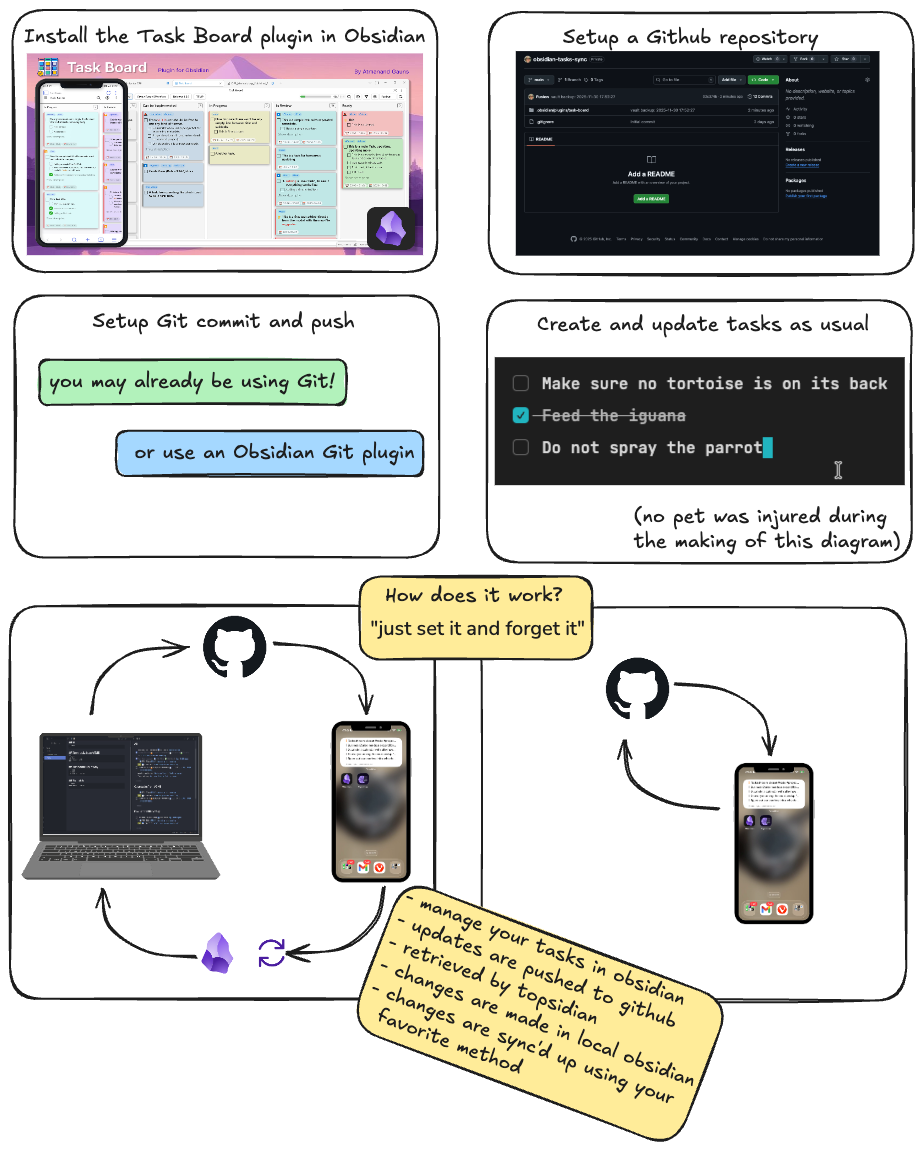
You still with me? Good!
Regarding the Github repo, which may appear to be the somewhat scary bit: it doesn’t have to be!
If you are not already using Github to synchronize Obsidian, and do not wish to switch, but still would like to use this flow, a few simple steps are required:
- Create an account (or use your existing one)
- Create a Github repo where you will store your Task Board tasks file
- If you value your privacy(!) make the repo private
- Then, create a fine access token
A fine access token? How?
- Click your user icon to open a menu, click Settings
- At the very bottom, click Developer settings
- Under Personal access tokens, click Fine-grained tokens, then Generate nwe token
- For scope, select only the repo you just created, and grant ‘Content’ access
- Make a note of your token value
Finally, configure Topsidian
- Open settings
- Enter your Github username, repo, and token
- Click ‘Test’ and you are all set
Now, following the instructions provided by Github on your repo page, create your local repo and push it.
But how do you push only that single file?
Again, if you wish to use this repo exclusively to push the tasks file and nothing else, create this .gitignore file at the root of your vault:
*
!.gitignore
!/.obsidian/
!/.obsidian/plugins/
!/.obsidian/plugins/task-board/
!/.obsidian/plugins/task-board/tasks.json
Fine. Where do I find the app?
That’s the million-dollar question - or, more accurately, the $99 question.
Apple wants me to shell out $99 every year for the privilege of sharing something I created. I understand that they provide the whole infrastructure and pay their app reviewers, etc., so I’m not going to begrudge them the money.
Right now I’m trying to gauge how much interest there is in this thing. Maybe I’ll ask everybody to pay a one-time $1.99 and figure it out from there. Hopefully that would cover the fee for the first year!
Comments powered by Talkyard.